Accelerate your sim & racing performance with Z1 RaceTech.
Accelerate your sim & racing performance with Z1 RaceTech.
The ULTIMATE AI Race Coach.
Flattening the learning curve, finding the gains, getting you fast, quick.
Compatible with all major sim titles and many real world racing products
6.7m+ Number of Laps Analyzed
30,000+ Number of Hours Coached
20+ Number of Sims Supported
DON'T TAKE OUR WORD FOR IT.
SEE WHAT THE SIM & RACING COMMUNITY THINKS.
Testimonials
"
I wish I had more time to race but I don't. Z1 makes every minute on track count by helping me
get to know the track and get faster, quicker."
Rich M.
"I think I would be lost now, if I had to race without Z1."
Ian P.
"You guys nailed it with the new live instructor, so much great info, very helpful even for
seasoned sim racers.
Steve E.
"An avid user since 2015 I have seen the Z1 suite grow to have an all inclusive feature list
that is very remarkable against the competition. I'm excited to see how Z1 will try and set
the bar in the years to come.
Miguel V.
"Love the new Driving Instructor. It is amazing!"
Sal P.
Will Power
IndyCar Champion
I use Z1 software to work on my technique. It has everything you need to understand
and analyze where you need to improve down to the smallest detail. It's a very important
tool for my race preparation.
JOIN NOW
DOWNLOAD FREE TRIAL
Z1 RACETECH PRODUCT SUITE
5 PROFESSIONAL RACING TOOLS TO HELP YOU LEARN FASTER & RACE QUICKER.
Z1 AI RACE COACH
AI-RACE COACH & CO-PILOT
Our cutting-edge AI Driving Coach is your personal mentor on the virtual track. Seasoned Pro or new
to sim racing, It offers real-time guidance, lap by lap, helping you master the art of sim racing.
Whether it's basics of learning the track, finding the perfect racing line, nailing the brake points,
or maximizing acceleration or squeezing our fractions of seconds to gain a podium place, our coach
is there to push your limits and unlock your potential.
Discover More
Z1 DASHBOARD
VITAL STATS AT YOUR FINGERTIPS
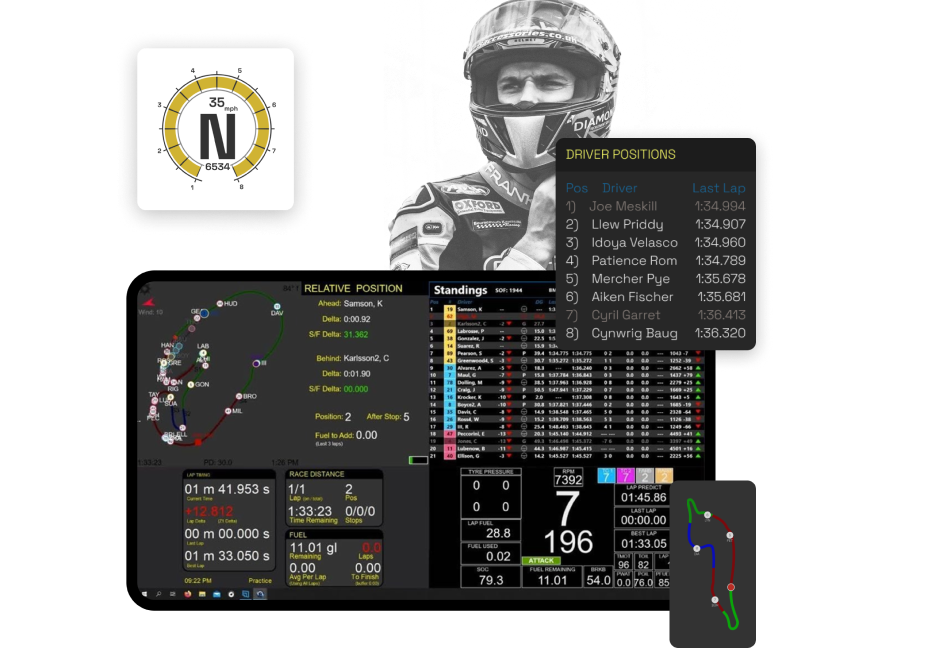
The Z1 Dashboard provides you vital statistics right where you need them. Fully configurable using
our Dashboard Editor, giving you exactly what you need, whether you're just starting your journey
or are a seasoned Pro.
Garage displays to help you learn about your current session out of the car
Speech and virtual engineer feedback including competitor tracking, weather, and standings
Live telemetry feedback for tire data, g-force and pedal inputs
Track maps including current position of all cars, your position after pit stop, time differences
and pit lanes
100's of premade dashboards available for your use and customisation
Discover More
Canon Service Tool 6100: Download =link= New
Ensure your real-time antivirus protection is active before downloading.
Instead of downloading a risky executable file, these services generate a unique key based on your printer's serial number to perform a reset safely. While this costs a small fee, it is often safer for the longevity of your printer and supports the developers who reverse-engineer these solutions.
The Canon Service Tool v6100 is a powerful utility that can save your printer from the landfill and save you money on repair fees. However, because it is an industry-grade tool, it requires caution, a stable USB connection, and precise adherence to Service Mode steps. canon service tool 6100 download new
Press and hold the button (triangle inside a circle). While holding Stop/Reset, press and hold the Power button.
Below is a comprehensive guide on what this tool does, how to find it safely, and how to use it to reset your printer. What is Canon Service Tool v6100?
Z1 DESIGNER
CUSTOMIZE YOUR DISPLAY FOR OPTIMUM INSIGHT
The Z1 Designer is a free application that lets you create your own dashboards for use with
the Z1 Dashboard.
Create new dashboards or download existing ones from our gallery
Place the info you need exactly where you need it
Share your designed dashboards with the Z1 community
Discover More
Z1 SERVER
MULTIPLATFORM CONNECTION, ALWAYS ON
Perfect for connecting to the ecosystem of racing, be it leagues you are racing in or teams that
you are running. The Z1 Server application allows you to broadcast your sim's data to any computer
on your network.
Run Z1 Dashboard on any computer on your network
Broadcast the joystick button inputs allowing you to control the dashboard switching and other
options from the main computer
Included with the Z1 software suite and can be registered using the same order number
Discover More
Ensure your real-time antivirus protection is active before downloading.
Instead of downloading a risky executable file, these services generate a unique key based on your printer's serial number to perform a reset safely. While this costs a small fee, it is often safer for the longevity of your printer and supports the developers who reverse-engineer these solutions.
The Canon Service Tool v6100 is a powerful utility that can save your printer from the landfill and save you money on repair fees. However, because it is an industry-grade tool, it requires caution, a stable USB connection, and precise adherence to Service Mode steps.
Press and hold the button (triangle inside a circle). While holding Stop/Reset, press and hold the Power button.
Allows technicians to read, save, and write the printer's core memory data.
Downloading the Service Tool from random file-sharing websites, forums, or torrents carries significant risks:
Step 2: How to Use Canon Service Tool v6100 to Reset Waste Ink
Below is a comprehensive guide on what this tool does, how to find it safely, and how to use it to reset your printer. What is Canon Service Tool v6100?